Healthcare Practice Management Software: Selection Framework for Clinics
 Jordan Reeves · September 4, 2026 · 21 min read · Published by Vero Scribe Inc.
Healthcare practice management software coordinates the administrative and financial work around a clinical encounter. Depending on the product, it may support scheduling, registration, eligibility, authorizations, charge handoff, claims, payments, patient balances, work queues, and operational reporting. Some products are modules inside an EHR; others are separate platforms or combine software with managed revenue-cycle services.
The practical buying question is not which product has the longest feature list. It is whether the proposed configuration can move a representative encounter from schedule to reconciled close with correct identity, visible status, controlled exceptions, acceptable staff effort, and a usable exit path.
This selection framework provides an eight-stage workflow map, an operation-level requirements matrix, transparent time-study and total-cost worksheets, security and integration tests, and an evidence-weighted scorecard. It does not publish a universal vendor ranking or invented clinic results. Product capabilities, fees, payer routes, and regulatory obligations must be verified for the clinic, jurisdiction, contract, and implementation date.
What is healthcare practice management software?
Healthcare practice management software is the operational system used to coordinate work before, around, and after care. The precise boundary differs. A small clinic may buy scheduling, billing, statements, and reporting in one EHR suite. A specialty practice may use a separate platform with purpose-built authorization or procedure workflows. A larger group may combine an EHR, patient-access tools, a clearinghouse, payment services, an interface layer, analytics, and a staffed billing service.
Common capabilities include:
- provider, location, room, equipment, and visit-type scheduling;
- patient registration, demographics, guarantor, and coverage information;
- reminders, intake forms, estimates, and patient communication;
- eligibility, authorization, referral, and prerequisite tracking;
- encounter status, charge handoff, claim edits, and submission;
- rejection, denial, appeal, and follow-up work queues;
- remittance, payment, adjustment, refund, and deposit reconciliation;
- statements, payment plans, balances, and dispute handling;
- operational, financial, access, security, and audit reporting; and
- configuration, roles, integrations, migration, support, recovery, and export.
That list describes categories, not proof. “Automated eligibility” may mean an overnight batch, an on-demand transaction, or a third-party portal link. “Integrated billing” may still require staff to copy a code, repair an identifier, or reconcile two status models. Requirements should state the operation, expected outcome, evidence, failure path, and owner.
Practice management software and an EHR are different systems of work
An EHR primarily preserves clinical information and supports care delivery. Practice management software primarily coordinates access, administrative operations, and financial workflow. They frequently share patient, provider, appointment, encounter, location, coverage, charge, and status data, so their boundary is operationally important even when both are sold as one suite.
For each shared field, define:
- the authoritative source;
- who may create or correct it;
- when a change moves downstream;
- how the receiving system acknowledges it;
- what happens during a timeout or rejection;
- which queue exposes the exception; and
- how teams reconcile records after recovery.
The broader EMR systems guide covers clinical and administrative platform selection. The EHR integration guide goes deeper into interface architecture, standards, and transaction testing. This page owns the practice-operations decision: whether the clinic can complete and control the whole administrative workflow.
Practice management software and revenue-cycle management are not synonyms
Revenue-cycle work includes eligibility, authorization, charge capture, claim submission, denial follow-up, remittance, patient responsibility, payment, and reconciliation. Practice management software may support much of that work, but it may not perform coding, clinical documentation, payer contracting, collection services, or every billing task.
Software plus a managed service changes the boundary again. A vendor may provide both the platform and staff who operate work queues. The contract then needs to name who performs each activity, what evidence each party can access, how quality is measured, how escalations work, and what happens to data and unfinished work at termination.
Map the work before comparing products
The AHRQ Workflow Assessment for Health IT Toolkit recommends examining clinical and administrative workflow when planning and implementing health IT. For a practice-management purchase, begin with the current operation rather than a vendor menu.
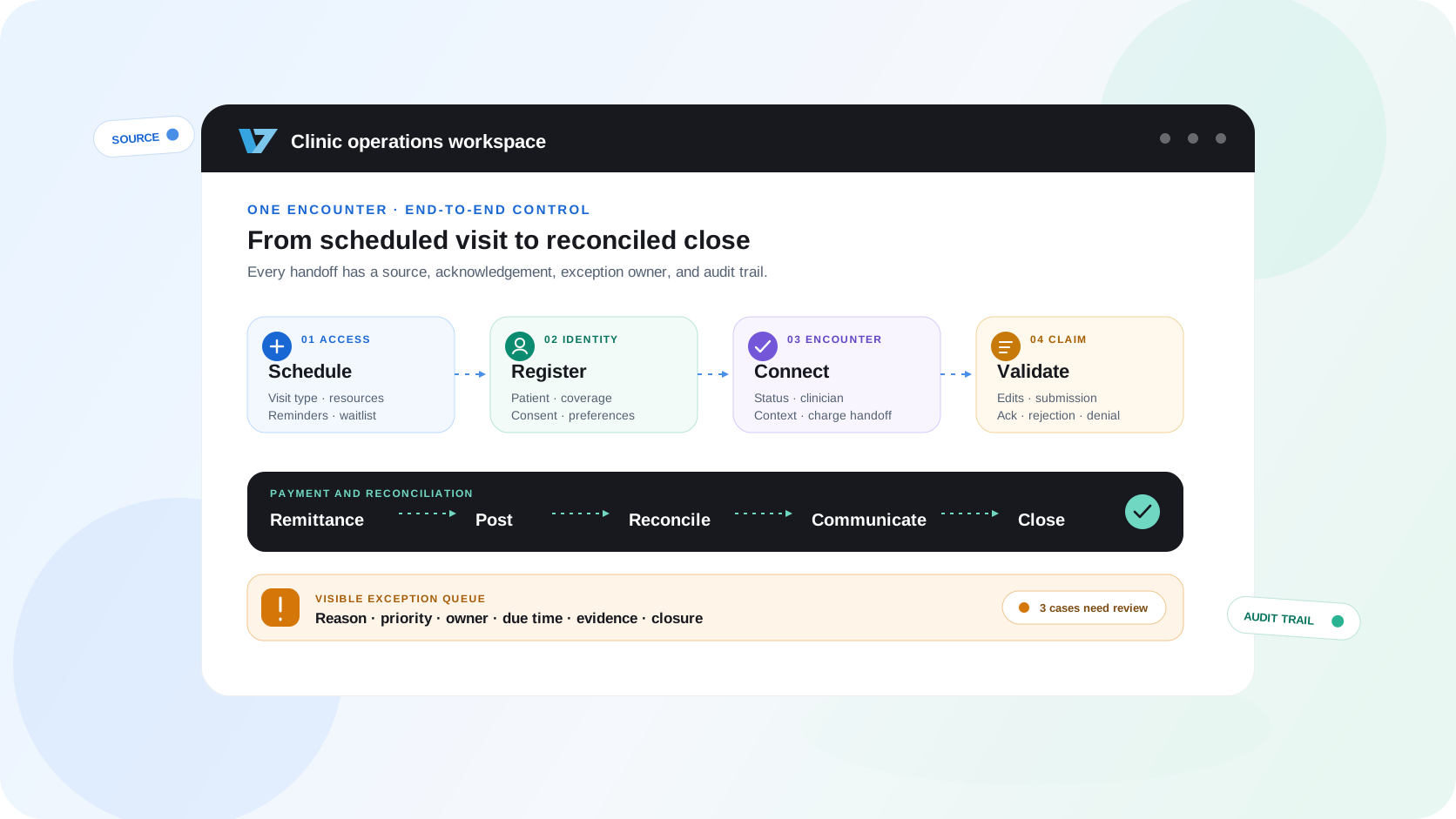
Clinic operating workflow
Follow one encounter from schedule to reconciled close
The software may own some stages and exchange data with other systems for the rest. Every handoff needs an authoritative source, acknowledgement, exception owner, and audit trail.
Stage 01
Schedule and prepare
Create the appointment, identify the visit type and resources, send permitted reminders, and make unresolved prerequisites visible.
Stage 02
Register and verify
Confirm identity, demographics, coverage, consent, contact preferences, and the authoritative source for each field.
Stage 03
Check in and route
Record arrival, collect required forms or balances, manage exceptions, and hand the patient to the correct clinical queue.
Stage 04
Connect the encounter
Keep appointment, patient, provider, location, documentation, orders, and charge context linked without duplicate entry.
Stage 05
Capture and validate charges
Receive authorized charge information, apply documented edits, expose missing data, and assign every exception to an owner.
Stage 06
Submit and monitor claims
Transmit through the approved route, retain acknowledgements, distinguish rejection from denial, and track ageing.
Stage 07
Post, reconcile, and communicate
Match remittance and payment, route variances, update patient responsibility, and preserve a traceable explanation.
Stage 08
Close, report, and improve
Resolve balances and exceptions, reconcile totals, monitor operational measures, and retain a usable audit and export trail.
Choose one representative unit, such as a scheduled established-patient visit, and follow it through every stage. Include normal work and failure paths. Record the people, systems, identifiers, inputs, outputs, decisions, queues, handoffs, controls, and waiting states.
Map the normal path and the exceptions
A normal-path demonstration can hide the work that determines operational success. Add synthetic cases for:
- similar names or a potential duplicate patient;
- a changed address, payer, guarantor, provider, or location;
- inactive or partial eligibility;
- a missing, expired, or mismatched authorization;
- a late cancellation, no-show, or waitlist fill;
- an incomplete charge or unsupported code combination;
- a clearinghouse rejection and a payer denial;
- a corrected or voided claim;
- partial, duplicate, reversed, or unmatched remittance;
- a returned statement or disputed balance;
- an unavailable interface or external service;
- downtime, recovery, queued work, and reconciliation; and
- export, transition, and deletion at exit.
For every exception, ask where it becomes visible, which role owns it, what clock applies, what evidence the user sees, and how completion is proven. An error that exists only in a log unavailable to clinic staff is not an operational control.
Define success before the demonstration
Write the expected result before a vendor shows the product. A useful acceptance statement is specific: “When coverage is inactive, the system records the response source and time, prevents the case from appearing verified, routes it to the eligibility queue, allows a reasoned override to an authorized role, and preserves the original and corrected state.”
“The screen turned green” is not equivalent evidence. Retain the configured rule, synthetic input, transaction or event record, visible user result, exception path, audit history, and report output.
Turn the workflow into testable requirements
Requirements become decision-useful when a second person can reproduce the test. The matrix below separates the desired operation from the test and the evidence the clinic should retain.
Scheduling and capacity
- Requirement
- Support visit types, provider and resource rules, waitlists, recurring appointments, reminders, cancellations, and controlled overbooking.
- Acceptance test
- Book, reschedule, cancel, and refill a slot while preserving the waitlist, resource conflict, message history, and audit trail.
- Evidence
- Configured rules, synthetic workflow result, audit record, exception path, and reporting sample
Registration and identity
- Requirement
- Maintain one authoritative patient and guarantor context with duplicate detection, correction, proxy, language, and accessibility fields.
- Acceptance test
- Present a similar-name patient, changed address, duplicate record, proxy contact, and inaccessible intake path.
- Evidence
- Matching rules, merge and correction controls, role permissions, audit sample, and accessibility result
Eligibility and authorization
- Requirement
- Send and retain eligibility or authorization transactions, display source and time, and distinguish unknown from confirmed status.
- Acceptance test
- Run active, inactive, partial, timed-out, corrected, and manually verified synthetic cases.
- Evidence
- Request and response samples, timestamp, payer route, timeout behavior, override reason, and owner
Encounter and charge handoff
- Requirement
- Link the scheduled encounter to documentation and authorized charge data without relying on silent copy or unowned worklists.
- Acceptance test
- Change provider, location, visit type, and status after check-in, then verify downstream context and reconciliation.
- Evidence
- Field map, interface result, acknowledgement, exception queue, corrected transaction, and audit history
Claims and edits
- Requirement
- Validate required data, preserve original and corrected submissions, separate rejection from denial, and expose timely filing risk.
- Acceptance test
- Submit clean, incomplete, duplicate, corrected, rejected, denied, and attachment-dependent synthetic claims.
- Evidence
- Edit source and version, claim and acknowledgement samples, status history, work queue, and ageing report
Payments and reconciliation
- Requirement
- Post electronic and manual payments, adjustments, refunds, and patient responsibility with controls against duplication and imbalance.
- Acceptance test
- Post a partial payment, reversal, duplicate remittance, unapplied amount, refund, and bank mismatch.
- Evidence
- ERA and posting result, control totals, variance queue, approval trail, and deposit reconciliation
Patient balances and communication
- Requirement
- Produce understandable statements, estimates, payment options, communication preferences, dispute routing, and complete account history.
- Acceptance test
- Correct an estimate, return mail, change responsible party, record a dispute, and reproduce the patient-facing explanation.
- Evidence
- Synthetic statement, calculation trace, delivery status, dispute workflow, accessibility, and audit record
Reporting and controls
- Requirement
- Define every metric, preserve filters and as-of dates, reconcile operational and financial totals, and restrict sensitive exports.
- Acceptance test
- Reproduce an appointment, claim, payment, and ageing metric from source records and identify late-arriving changes.
- Evidence
- Data dictionary, lineage, control total, saved report, role test, export log, and correction process
Privacy, security, and resilience
- Requirement
- Apply least privilege, strong authentication, logging, retention, incident response, downtime, backup, and tested recovery to the real data flow.
- Acceptance test
- Remove a user, restrict a role, investigate an export, interrupt a dependency, restore service, and reconcile queued work.
- Evidence
- Risk analysis, role matrix, audit export, incident plan, recovery result, backlog reconciliation, and contract terms
Implementation, support, and exit
- Requirement
- Assign migration, configuration, training, support, release, integration, data-export, transition, and deletion responsibilities.
- Acceptance test
- Import a representative dataset, operate one release cycle, export usable records and configurations, and test independent access.
- Evidence
- RACI, migration reconciliation, release plan, service levels, full export, import result, and exit schedule
Identity and scheduling deserve explicit controls
Scheduling is not merely a calendar. Visit type can affect duration, resource assignment, intake, authorization, documentation, charge context, and patient instructions. A change after check-in may need to update several systems without creating a second encounter or losing the original trail.
Test same-name patients, preferred names, proxy contacts, merged records, corrected demographics, cross-location scheduling, recurring visits, shared equipment, resource conflicts, waitlists, and rescheduling after prerequisites have begun. A strong interface prevents unsafe ambiguity and makes the remaining ambiguity visible.
Eligibility status must preserve source and time
An eligibility response is evidence from a particular source at a particular time. It is not a promise of payment. The system should distinguish active, inactive, partial, unknown, timed out, manually verified, and overridden states. It should also preserve the request, response, payer route, time, user action, and next owner.
In the United States, CMS Administrative Simplification describes adopted standards and operating rules for covered administrative transactions. Applicability and exact implementation still depend on the transaction, regulated parties, trading partners, payer, and current rule.
Claim status needs more precision than “submitted”
Submission can produce a transport acknowledgement, format rejection, clearinghouse acceptance, payer acceptance, adjudication, denial, payment, request for information, or no usable response. These are different states with different owners and clocks.
The software should preserve original and corrected submissions, acknowledgements, edit sources and versions, rejection and denial reasons, work history, attachments, timely-filing dates, and closure evidence. In March 2026, CMS published its final-rule fact sheet for electronic health care claims attachments and electronic signatures. CMS states that the rule took effect May 26, 2026 and that compliance deadlines are 24 months after the effective date. Clinics should verify current payer and trading-partner implementation.
Payment posting is not reconciliation
Electronic remittance can automate posting only if identifiers, adjustments, reversals, and control totals are handled correctly. CMS explains the ERA and EFT transaction standards, but an operational test must continue through the actual posting and bank-reconciliation workflow.
Test partial payments, takebacks, duplicates, unapplied amounts, patient responsibility, contractual adjustments, refunds, and a deposit that does not match the remittance total. The system should not force staff to make the ledger balance by hiding a variance.
Choose the operating model before the vendor
The operating model affects who owns infrastructure, interfaces, configuration, work queues, staffing, security, support, and exit. Compare the complete service, not only the application interface.
Decide what the clinic wants to own
Operating-model decision
Product category changes interface count, support ownership, staffing, and exit risk. It does not remove the need to test the complete workflow.
EHR-native suite
- Often fits
- Clinics prioritizing one vendor, shared patient context, and fewer core interfaces
- Tradeoff
- Workflow may be cohesive, but pricing, configuration, reporting, and exit remain tied to the broader platform.
- Verify
- Contracted modules, write-back behavior, charge handoff, reporting boundary, and full export
Standalone practice management platform
- Often fits
- Clinics needing stronger administrative depth or a different system of record for operations
- Tradeoff
- Can improve specialized workflows but creates more identity, interface, reconciliation, and support ownership.
- Verify
- Interface direction, latency, duplicate prevention, exception queues, and responsibility split
Specialty-specific platform
- Often fits
- Practices with distinctive scheduling, authorization, inventory, procedure, or billing patterns
- Tradeoff
- Specialty depth can reduce workarounds, while a narrower ecosystem may affect integrations and portability.
- Verify
- Specialty cases, payer rules, reporting definitions, upgrade path, customer references, and export
Software plus managed revenue-cycle service
- Often fits
- Clinics seeking technology and staffed billing operations under one accountable service
- Tradeoff
- The service can absorb work, but performance depends on staffing, escalation, data access, incentives, and contract terms.
- Verify
- Named work split, service levels, staffing continuity, denial ownership, data rights, fees, and termination support
An EHR-native suite can reduce core interfaces, but it may concentrate dependency and make a later component change harder. A standalone platform can provide deeper administrative workflow while increasing synchronization and reconciliation work. A specialty system can fit distinctive cases but may have a narrower partner ecosystem. A managed revenue-cycle service can add operational capacity while making staffing, access, quality measures, and termination assistance central contract terms.
Cloud hosting is also not a complete operating model. The HHS cloud computing guidance explains that HIPAA-regulated entities remain responsible for appropriate arrangements and safeguards when using cloud services. Canadian organizations should identify the applicable privacy law, custodian or controller roles, service-provider duties, processing locations, subcontractors, and access rights for their jurisdiction.
Verify the billing route by market
Practice-management and billing workflows are not interchangeable across the United States and Canada, or among Canadian provinces. The same product name can refer to different modules, transaction routes, enrollment requirements, and supported versions. Ask for evidence from the exact jurisdiction and configured service.
Ontario’s Ministry of Health states that specialized software used with Medical Claims Electronic Data Transfer and Health Card Validation web services must complete ministry conformance testing. Its OHIP claims and health-card validation publications include current technical specifications and lists of software names and versions that completed testing. Conformance is evidence for the named service and version; it is not a ministry endorsement or proof that the rest of a clinic workflow is suitable.
British Columbia uses a different route. The province states that practitioners submit Medical Services Plan claims through Teleplan. Its physician enrollment guidance identifies Teleplan enrollment and billing or business software details, while the MSP claim-submission resources describe claims, eligibility, remittance, and supporting workflows. A clinic should test the current Teleplan specifications and proposed vendor configuration rather than treating Ontario capability as Canadian capability.
United States
- Verify the route
- Identify the covered transaction, payer or clearinghouse route, adopted standard, operating rule, acknowledgement, and applicable HIPAA relationship.
- Procurement test
- Submit a synthetic transaction through the proposed route, retain every acknowledgement, trigger a rejection, correct it, and reconcile the final status.
Ontario
- Verify the route
- For insured physician claims and health-card validation, verify the current OHIP, MCEDT, HCV, billing-number, enrollment, technical-specification, and conformance-testing requirements.
- Procurement test
- Confirm the exact software name and version on the current conformance list, then test submission, reports, eligibility or validation, correction, and remittance handling.
British Columbia
- Verify the route
- For MSP claims, verify Teleplan enrollment, data-centre and billing-software details, current record specifications, secure submission, eligibility, refusal, and remittance workflows.
- Procurement test
- Use the proposed billing configuration to send synthetic claims and notes, retrieve responses, repair a refusal, and preserve the session and reconciliation evidence.
Other Canadian jurisdictions
- Verify the route
- Identify the provincial or territorial plan, provider enrollment, billing specification, vendor or interface requirements, privacy regime, and private-insurer routes that actually apply.
- Procurement test
- Require jurisdiction-specific evidence. Do not accept Ontario, British Columbia, U.S., or generic “Canadian” capability as proof for another market.
The table is a procurement boundary, not a complete billing manual. Provincial plans, private insurers, specialties, alternative payment models, organization types, and privacy obligations can create additional requirements. Recheck every dated source and specification before contracting or go-live.
Run a transparent clinic time study
Practice-management software is often bought to reduce administrative work. That claim should be measured at the clinic’s workflow boundary rather than inferred from clicks in a demonstration.
Two workforce studies illustrate why the measurement method matters. In a 2016 time-and-motion study, Sinsky and colleagues directly observed 57 U.S. physicians in four specialties for 430 hours, supplemented by after-hours diaries from 21 physicians. The study reported 27% of office-day time in direct clinical face time and 49.2% in EHR and desk work. The authors noted that participating practices were self-selected and viewed as high performing, so the descriptive results should not be treated as a universal clinic benchmark. Read the PubMed record.
In a 2017 event-log study, Arndt and colleagues analyzed work by 142 family physicians in one southern Wisconsin health system over three years. They reported substantial EHR time, including clerical, administrative, and inbox work. Event logs can measure system activity at scale, but they do not capture every off-system task, and results from one organization and an older software period do not establish the effect of a current practice-management product. Read the PubMed record.
These studies support measuring work; they are not product comparisons. A local study should state its sample, unit, roles, inclusion rule, observation method, and limitations.
A reproducible illustrative protocol
The worksheet below uses a proposed operational design: 120 consecutive eligible encounters across 10 baseline days and 120 comparable encounters across 10 pilot days, involving two scheduling or front-desk roles, two clinicians, and two billing roles. Those numbers are assumptions for planning, not Vero results, clinic observations, or a statistical power calculation.
Keep visit types, locations, operating hours, inclusion rules, and the stopping rule consistent. Record active handling time by role, waiting separately, and each encounter with correction, duplicate entry, manual recovery, or an extra unplanned handoff. Report exclusions and incomplete observations.
Compare handling time with an explicit sample
Browser-local worksheet
Enter observed totals from comparable baseline and pilot periods. Empty fields count as zero. This calculator describes workload; it does not prove causation, safety, revenue, or statistical significance.Calculations stay in this browser tab; this worksheet does not submit the values you enter.
baseline period
- Minutes per encounter
- Add encounters
- Exception share
- Add encounters
pilot period
- Minutes per encounter
- Add encounters
- Exception share
- Add encounters
Pilot minus baseline
Enter both samples
Illustrative protocol assumptions
- Unit of analysis
- One eligible scheduled encounter from appointment preparation through the defined billing handoff
- Baseline sample
- 120 consecutive eligible encounters across 10 clinic days
- Pilot sample
- 120 consecutive eligible encounters across 10 comparable clinic days
- Roles observed
- Two scheduling or front-desk roles, two clinicians, and two billing roles
- Time measure
- Active handling minutes by role; waiting time is recorded separately
- Exception measure
- Any encounter requiring correction, duplicate entry, manual recovery, or an extra unplanned handoff
- Comparison rule
- Use the same visit types, locations, operating hours, inclusion rules, and stopping rule in both periods
- Interpretation limit
- This is a proposed study design, not observed clinic data and not a statistical power calculation
Do not measure time alone
Faster work can still be less reliable. Pair handling time with:
- identity and registration defects;
- eligibility or authorization exceptions;
- late cancellations, no-shows, and unused capacity;
- charge lag and missing-charge rate;
- first-pass acceptance using a stated definition;
- rejection and denial counts by reason and age;
- days and effort to resolve exceptions;
- unapplied or unreconciled payments;
- patient statement corrections and disputes;
- staff-reported workload and interruption;
- downtime and recovery backlog; and
- safety or privacy events reviewed outside the average.
Define the numerator, denominator, data source, time window, exclusion rule, and owner for every measure. A vendor’s “clean claim rate” cannot be compared with the clinic’s figure until both definitions match.
Interpret the result conservatively
A before-and-after difference does not prove the software caused it. Staffing, season, payer mix, visit type, policy, training, backlog, and observation effects can change the result. A small pilot may miss rare but serious failures. Treat the study as local decision evidence, report uncertainty, and keep hard-stop defects outside a weighted average.
Integration and data integrity constraints
Practice-management workflows cross the EHR, clearinghouse, payer, payment service, portal, messaging provider, bank, analytics tools, and sometimes external billing staff. For every connection, record:
| Constraint | What to verify |
|---|---|
| Identity | Patient, guarantor, provider, organization, location, payer, plan, and encounter identifiers |
| Authority | Which system may create, correct, merge, void, and close each field or status |
| Direction | Read, write, update, event, batch, and query behavior |
| Timing | Real-time, scheduled, delayed, retry, timeout, and late-arriving changes |
| Meaning | Code systems, local mappings, units, effective dates, nulls, and unknown states |
| Acknowledgement | What technical receipt, business acceptance, and completed workflow each response proves |
| Correction | Reversal, replacement, merge, resubmission, and downstream propagation |
| Exception | Visible queue, priority, owner, due time, escalation, and closure evidence |
| Reconciliation | Control totals and record-level checks after normal processing and recovery |
| Change | Versioning, test environment, notice, regression testing, and rollback |
An integration claim should be dated and version-specific. Ask whether the interface is included, generally available, separately contracted, limited to a partner or geography, or dependent on a clearinghouse. Test the proposed combination instead of assuming that two supported products support each other.
Privacy, security, and resilience questions
Security review should follow the real data flow, including support tools, exports, backups, analytics, subcontractors, payment services, communication providers, and managed-service staff.
In the United States, the HHS Security Rule summary and HHS risk-analysis guidance provide primary guidance for regulated electronic protected health information. In Canada, the Office of the Privacy Commissioner’s PIPEDA accountability guidance explains organizational responsibility under PIPEDA; health-information and private-sector privacy requirements vary by province, territory, organization, and activity.
Ask for evidence covering:
- data inventory, classification, flow, residency, retention, and deletion;
- business-associate or service-provider roles and subcontractors;
- authentication, least privilege, role design, privileged access, and access review;
- encryption, key management, secrets, devices, and session controls;
- audit events, export monitoring, alerting, investigation, and customer access to logs;
- vulnerability management, secure development, independent testing, and remediation;
- incident detection, notice, evidence preservation, responsibility, and exercises;
- backup isolation, restore objectives, dependency failure, downtime operation, and reconciliation;
- service levels, support access, staff screening, and separation of duties;
- supplier risk, change notice, audit rights, data uses, and termination controls.
The NIST Cybersecurity Framework 2.0 provides a risk-management structure, while NIST SP 1305 addresses cybersecurity supply-chain risk. These voluntary resources can organize questions but do not certify a product or replace applicable law.
Test downtime through reconciled recovery
A downtime test should interrupt a real dependency, preserve the minimum work needed to operate, restore service, process queued items, identify duplicates or omissions, and reconcile the final state. The 2025 SAFER Guides include recommended practices for safer EHR use and organizational resilience. Use the relevant guide as input, then test the clinic’s actual architecture.
Include accessibility in the acceptance criteria
Patients and staff need to use scheduling, intake, payment, and communication interfaces across devices and abilities. The Web Content Accessibility Guidelines 2.2 provide testable criteria. Procurement should also test keyboard operation, focus order, labels, errors, contrast, zoom, reflow, screen-reader behavior, language, and alternative channels with representative users.
Compare total cost on the same basis
Compare the same modules, locations, providers, transactions, integrations, services, support, and time period. Include:
- subscriptions, licenses, minimums, tiers, and price increases;
- implementation, configuration, workflow design, and project management;
- migration, validation, interface build, partner fees, and testing;
- clearinghouse, eligibility, claims, attachments, messaging, statements, and payment fees;
- devices, networks, identity, security, backup, and reporting tools;
- training, temporary productivity loss, internal administration, and support;
- billing or managed-service fees and exclusions;
- upgrades, custom reports, new locations, acquired practices, and change requests;
- downtime, rework, manual reconciliation, and failed transactions; and
- export, transition assistance, parallel operation, retention, and deletion.
Normalize the pricing unit. Per-provider, per-user, per-location, per-claim, percentage-of-collections, and bundled-service quotes are not directly comparable. Use clinic volumes and reasonable high/low scenarios without presenting uncertain inputs as a market fact.
Compare total cost across three clinic scenarios
Quote-normalization worksheet
Enter comparable quote terms once, then adjust the editable clinic volumes. The starting scenarios are illustrative sensitivity inputs, not market benchmarks or Vero customer data. Calculations stay in this browser tab and this worksheet does not submit the values you enter.
Decision period
Lower-volume result
$0.00
Total over 36 months
- Recurring monthly
- $0.00
- One-time cost
- $0.00
- Per provider/month
- $0.00
- Per claim
- $0.00
Base result
$0.00
Total over 36 months
- Recurring monthly
- $0.00
- One-time cost
- $0.00
- Per provider/month
- $0.00
- Per claim
- $0.00
Higher-volume result
$0.00
Total over 36 months
- Recurring monthly
- $0.00
- One-time cost
- $0.00
- Per provider/month
- $0.00
- Per claim
- $0.00
The contract should match the product and configuration that passed testing. Attach or reference the data-use terms, security responsibilities, implementation statement of work, migration rules, interface list, service levels, support model, fees, change process, export specification, transition assistance, deletion, remedies, and termination conditions.
How to select practice management software
Use hard stops first. A high average should not offset uncontrolled wrong-patient risk, silent claim loss, missing privacy terms, failed recovery, or an unusable export. Then use a weighted score for the remaining evidence.
Clinic practice-management scorecard
Evidence-weighted comparison
This fixed example uses Vero editorial starting weights. Score retained evidence from 0 to 5, and keep hard stops outside the average.
Weighted result
0.0 / 100
Hard stops
- Wrong-patient, duplicate, or identity corrections cannot be controlled and audited.
- Claims, payments, exports, or patient communications can fail without a monitored exception.
- Required data access, BAA or privacy terms, security evidence, or incident duties remain unresolved.
- A representative downtime and recovery test loses, duplicates, or leaves work unreconciled.
- The clinic cannot obtain a complete usable export and transition support on acceptable terms.
The displayed weights are Vero’s illustrative editorial starting weights, not validated industry weights or a recommendation for every clinic. They sum to 100% and intentionally give the most weight to workflow completion. A clinic that changes the priorities should document its approved weights before demonstrations and calculate the comparison outside this fixed-weight example.
Score observed evidence, not presentation quality
Use the same script, synthetic cases, time allowance, and scoring rubric for every finalist. A practical 0-to-5 scale is:
- 0: not demonstrated or contradicted;
- 1: claim only, with no configuration-specific evidence;
- 2: partial demonstration with material unresolved gaps;
- 3: expected workflow completed with acceptable evidence;
- 4: normal and failure paths completed with strong retained evidence; and
- 5: reproducible completion plus controls, monitoring, support, and exit evidence.
Record the evaluator, date, product version, modules, configuration, integrations, environment, evidence link, limitation, and open dependency beside every score. Re-score when a material condition changes.
“Best” means best for the bounded clinic decision
There is no defensible universal “best medical practice management software” without specifying the practice, specialties, locations, staffing, payer mix, volume, patient access needs, EHR, integrations, jurisdiction, budget, risk tolerance, and contract.
A smaller clinic may prefer fewer interfaces and simpler support. A multi-location group may weight centralized scheduling, role segmentation, enterprise reporting, and identity governance more heavily. A specialty clinic may need authorization, procedure, inventory, or recurring-treatment depth. The winner is the option that clears the clinic’s hard stops and produces the strongest evidence for its weighted needs.
Implementation from discovery to stabilization
Implementation should be managed as an operating change, not an installation date.
1. Discovery and governance
Name an executive owner, operational owner, clinical representative, billing lead, privacy and security leads, technical owner, trainers, and vendor counterparts. Approve scope, decision rights, risks, measures, change control, and escalation.
2. Workflow and requirements
Map normal and exception paths, identify authoritative data, define future-state ownership, and finalize acceptance tests. Remove unnecessary steps before automating them.
3. Configuration, migration, and integration
Configure visit types, resources, roles, forms, messages, edits, work queues, reports, and financial rules. Map and cleanse source data. Reconcile record counts, control totals, representative fields, statuses, and rejected records. Build and document integrations with monitoring and retry behavior.
4. Testing and approval
Run unit, interface, workflow, accessibility, privacy, security, reporting, downtime, recovery, export, and user-acceptance tests. Record expected and observed results. Resolve or formally accept each variance with an owner and due date.
5. Training and cutover
Train by role using the configured system and exception cases. Define the final migration, appointment freeze or conversion rules, communication plan, support coverage, go/no-go criteria, rollback triggers, and reconciliation steps.
6. Stabilization and optimization
Monitor queues, failures, access, staff effort, patient issues, claims, payments, and reconciliation daily at first. Separate configuration problems from training, policy, staffing, interface, and external-partner problems. Close high-risk defects before expanding scope.
Monitor after launch
Maintain a dated operating dashboard with measure definitions and owners. Review access and privileged roles, interface failures, aged work, charge lag, rejection and denial reasons, remittance variances, patient disputes, support cases, downtime, release changes, and export readiness. Repeat the time-study method after the workflow stabilizes rather than comparing a mature baseline with the first chaotic days of launch.
Author and review status
Written by Jordan Reeves, a Vero contributor covering EMR and EHR systems, interoperability, clinical documentation workflows, and healthcare technology comparisons. Sources checked September 4, 2026. This version has not received separate review by a practicing clinician or practice administrator.
Sources and further reading
- AHRQ: Workflow Assessment for Health IT Toolkit
- Sinsky et al.: Allocation of Physician Time in Ambulatory Practice
- Arndt et al.: Tethered to the EHR
- CMS: HIPAA Administrative Simplification
- CMS: Health care payment, remittance advice, and electronic funds transfer
- CMS: 2026 health care claims attachments final rule fact sheet
- HHS: Summary of the HIPAA Security Rule
- HHS: Guidance on HIPAA risk analysis
- HHS: HIPAA and cloud computing
- ASTP/ONC: 2025 SAFER Guides
- NIST: Cybersecurity Framework 2.0
- NIST SP 1305: Cybersecurity supply-chain risk management
- Office of the Privacy Commissioner of Canada: PIPEDA accountability
- Ontario Ministry of Health: OHIP claims and health-card validation publications
- British Columbia: physician enrollment and Teleplan requirements
- British Columbia: MSP claim submission and payment
- W3C: Web Content Accessibility Guidelines 2.2
Frequently asked questions about healthcare practice management software
Direct answers about practice management software, EHR boundaries, workflow measurement, integrations, billing, security, cost, contracts, and implementation.
What is healthcare practice management software?
Healthcare practice management software supports the administrative and financial work around care, including scheduling, registration, eligibility, charge capture, claims, payments, patient balances, and reporting. Its exact boundary varies by product and clinic.
What is the difference between practice management software and an EHR?
Practice management software primarily manages operational and revenue-cycle workflows, while an EHR primarily manages the clinical record. They may be separate products or modules in one suite, but the clinic should still define the authoritative source and handoff for each field and status.
What is the best medical practice management software?
The best medical practice management software is the product that completes the clinic’s tested workflows with acceptable safety, workload, financial control, integration, security, support, and lifecycle cost. A universal ranking is not credible without matching the clinic, configuration, payer mix, and evidence.
Which features should small clinics prioritize?
Small clinics should prioritize reliable scheduling, registration, eligibility, charge and claim handoff, payment reconciliation, patient communication, role-based access, useful reporting, responsive support, and usable export. Fewer well-tested workflows are more valuable than a long feature list.
Can practice management software reduce administrative work?
It can reduce work when it removes duplicate entry, makes status visible, automates a reliable transaction, and routes exceptions to an owner. It can also create work through poor configuration, failed interfaces, extra logins, unclear queues, or manual reconciliation, so the clinic should measure before and after.
How should a clinic measure workflow time?
Define one unit of work, observe consecutive eligible cases, record active handling time by role, keep waiting time separate, and count rework and exceptions. Use the same scope and stopping rule for the baseline and pilot, and report the sample size and exclusions.
Show all questions
How many encounters should a practice-management pilot include?
There is no universal sample size. The article’s illustrative protocol uses 120 baseline and 120 pilot encounters as a manageable operational sample, but a clinic should choose its sample from workflow volume, variation, risk, and the precision needed for the decision.
What should be tested in a vendor demonstration?
Test the same synthetic normal, correction, duplicate, permission, timeout, rejection, denial, payment, downtime, recovery, and export cases for every finalist. Record expected results before the demonstration and retain evidence from the proposed configuration.
How should practice management software integrate with an EHR?
The integration should define the authoritative source, direction, fields, identifiers, statuses, timing, acknowledgement, correction behavior, retry rules, and exception owner for each operation. A generic claim that the products integrate is not enough.
What is the difference between a claim rejection and a denial?
A rejection generally means a claim failed an early submission or validation step and was not accepted for adjudication, while a denial follows payer adjudication. The software should preserve the actual status, source, reason, owner, correction path, and timely-filing clock.
Does practice management software need to be HIPAA compliant?
A U.S. clinic must evaluate how the real service and vendor relationship fit applicable HIPAA duties. When a vendor creates, receives, maintains, or transmits ePHI on behalf of a regulated entity, appropriate safeguards, risk analysis, and business-associate terms may be required.
What should Canadian clinics verify?
Canadian clinics should identify the applicable federal, provincial, or territorial privacy and health-information rules, data-custody roles, processing locations, third parties, access controls, retention, patient rights, incident duties, and contract protections. Requirements vary by jurisdiction.
Should a clinic choose cloud or on-premises software?
Choose the operating model that the clinic can secure, support, recover, and exit. Cloud service does not remove customer responsibility, and local hosting does not guarantee resilience or portability. Test the real architecture and responsibility split.
How much does medical practice management software cost?
Cost can include subscription or license fees, implementation, interfaces, transactions, clearinghouse services, payment processing, devices, migration, training, support, internal administration, rework, downtime, and exit. Compare vendors over the same scope and decision period.
What reports should a practice management system provide?
Useful reports cover scheduling capacity, cancellations, eligibility exceptions, charge lag, submission status, rejection and denial ageing, remittance, payments, patient balances, work queues, access, and audit activity. Every metric needs a definition, source, filters, and as-of time.
How should a clinic evaluate patient communication features?
Test message content, timing, consent or preference, language, accessibility, proxy use, delivery status, opt-out, correction, escalation, and audit history. A sent message is not proof that the intended recipient received or understood it.
What should be included in the software contract?
The contract should match the evaluated product, modules, configuration, interfaces, data uses, security duties, service levels, implementation work, support, fees, change notice, audit evidence, migration, usable export, transition assistance, deletion, remedies, and termination conditions.
When should a clinic replace its practice management software?
Replacement is worth evaluating when the current system creates material safety, access, financial, integration, security, support, reporting, or portability problems that cannot be corrected reasonably. Measure the current workflow before assuming replacement is the best remedy.
